Best subtitle translators.
Compare by workflow.
The best subtitle translator depends on your starting point and delivery format. After building subtitle translation tools and comparing workflows since 2019, we've found that choosing the right tool matters more—a direct SRT translator finishes in seconds, while a video-based workflow can take minutes or hours for the same text. This guide compares the best subtitle translation software and the best translate site for subtitle work. Some tools translate existing SRT files directly. Others generate subtitles from video audio, then translate them. Human services offer the highest accuracy for professional content.
Choose by your starting file and target format
An existing SRT file only needs translation—upload, review and download. A video without subtitles needs transcription first, then translation. If you need captions burned into an MP4, add a video export step. These are separate workflows, even when one service combines them.
- Starting with an SRT or VTT file: Look for direct file import, inline editing and downloadable subtitle formats. No video upload required.
- Starting with video or audio: Compare speech recognition accuracy, how corrections are handled, and whether translation happens automatically or as a separate step.
- Need a captioned MP4: Check whether the service exports video, what resolution and format options it offers, and whether there is a watermark on free plans.
- Need human-reviewed translation: Confirm language pairs offered, turnaround time and whether revisions are included in the quoted price.
Tools that translate SRT and VTT files directly
These services accept subtitle files as input and return translated subtitle files as output. No video upload required. This is the fastest workflow when you already have properly timed, proofread subtitles.
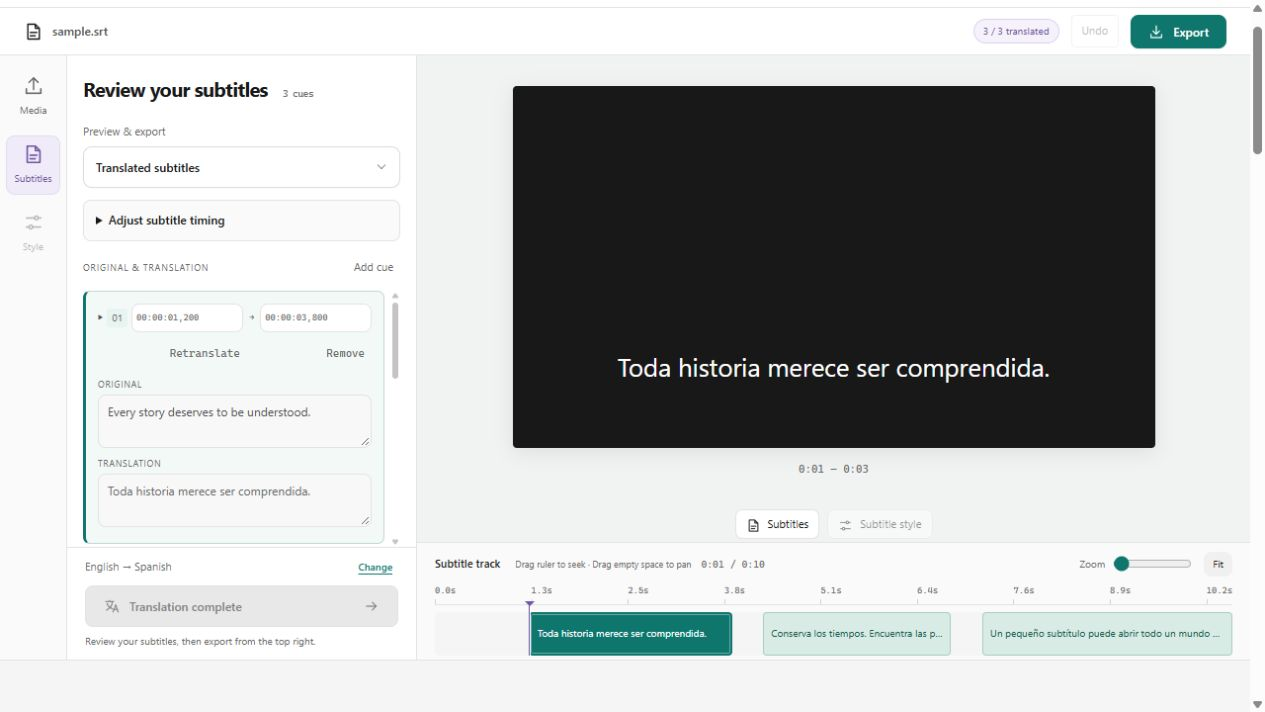
- Subtitle Translator on this site preserves original timing automatically. Upload an SRT, translate, review in the inline editor, and download the translated SRT with timing intact.
- DeepL produces higher quality translations for European languages (German, French, Spanish) compared to Google Translate, but it does not handle SRT files natively. Paste cue text, translate, then rebuild the SRT manually.
- Google Translate supports 133 languages—more than any subtitle-specific tool. The manual workflow (copy text, paste, translate, rebuild SRT) is tedious but free and works for rare language pairs.
- For bulk translation (translating the same SRT into 5+ languages), tools with API access (DeepL, Google Cloud Translation) can process multiple languages in parallel.
| Tool | Input formats | Languages | Editing features | Export formats |
|---|---|---|---|---|
| Subtitle Translator (this site) | SRT, VTT | 22 languages | Side-by-side editor, timing preserved | SRT, VTT, TXT |
| DeepL | Text paste or API | 31 languages | No built-in subtitle editor | Manual reconstruction required |
| Google Translate | Text paste | 133 languages | No built-in subtitle editor | Manual reconstruction required |
Tools that transcribe video, then translate subtitles
Happy Scribe, Sonix, Rev and similar services start with video or audio files, generate subtitles using speech recognition, then translate the text into your target language. This workflow suits videos without existing subtitles.
- Happy Scribe charges separately for transcription and translation. Check the pricing page for per-minute rates and whether your plan includes both services.
- Sonix emphasizes multi-speaker identification. Speaker labels carry through translation, making it useful for interviews and podcasts.
- Rev offers both AI and human transcription/translation. Human translation costs $5-12 per minute but reaches 98%+ accuracy, making it the standard for legal, medical and broadcast content.
- All three services let you edit transcription errors before translating. Correcting mistakes in the source language before translation prevents those errors from being translated.
| Service | Transcription | Translation | Subtitle export | Pricing model |
|---|---|---|---|---|
| Happy Scribe | 120+ languages | 120+ languages | SRT, VTT, TXT, STL, DFXP | Pay per minute (transcription + translation) |
| Sonix | 49 languages | 40+ languages | SRT, VTT, DFXP, TXT | Monthly plans or pay-as-you-go |
| Rev | AI or human | AI or human | SRT, VTT, TXT, SCC | Per minute (separate AI/human pricing) |
Video editors with subtitle translation built in
VEED, Kapwing and similar online video editors combine video editing, subtitle generation and translation in one interface. These tools are convenient for social media creators who need editing and subtitles together, but may be overkill if you only need subtitle translation.
- VEED supports 125 languages for subtitle translation and can burn captions into exported video. Free plan includes 10 minutes per month with watermark.
- Kapwing offers collaborative editing—teams can review and edit translated captions together in real-time. Useful for marketing teams managing multilingual campaigns.
- Both tools generate subtitles from video audio automatically, then let you translate the result. You can also upload an existing SRT file if you have one.
- Exported videos include burned-in captions by default. Download the SRT separately if you need a subtitle file for uploading to YouTube or Vimeo.
- These tools are best for creators who need video editing AND subtitles. If you only need subtitle translation, a dedicated subtitle translator is faster and cheaper.
When to use human translation instead of AI
Machine translation works well for straightforward dialogue and common language pairs, but human translators are necessary for content where errors have consequences. Legal documents, medical instructions, corporate training and broadcast television require human accuracy.
- Use human translation when accuracy is more important than speed: legal videos, medical content, government communications, product instructions, broadcast TV.
- Use human translation for creative content where tone matters: marketing videos, brand messaging, entertainment subtitles with cultural references and wordplay.
- Use AI translation when speed is critical and minor errors are acceptable: YouTube videos, online courses, internal corporate videos, social media captions.
- Rev human translation costs $5-12 per minute of video. A 10-minute video costs $50-120. Turnaround is 12-48 hours depending on language pair and urgency.
- Freelance translators on Upwork or Fiverr cost less than professional services but quality varies. Always request samples and check reviews before hiring.
- For the best balance of speed and quality, use AI translation for the first draft, then hire a native speaker to review and correct errors. This hybrid approach costs 50-70% less than full human translation while maintaining high accuracy.
Subtitle translation accuracy: what to expect
Machine translation accuracy varies by language pair, content type and context. European language pairs (English-Spanish, English-French) translate more accurately than Asian language pairs (English-Chinese, English-Japanese). Technical and creative content is harder to translate than straightforward dialogue.
- Common machine translation errors: Proper names translated instead of kept in original language, idioms translated literally (losing meaning), technical terms mistranslated without domain knowledge.
- Numbers and dates sometimes change during translation. Always verify that numbers in the translated output match the source exactly.
- Formal vs informal tone: Machine translation defaults to neutral or formal register. If your video is conversational, the translated subtitles may sound stiff. Human review can adjust tone.
- Context matters: The word "bank" can mean financial institution or riverbank. Without video context, machine translation may choose the wrong meaning. Always review AI output while watching the video.
- Professional translators spend 30-40% of their time correcting machine translation output, according to industry surveys. Budget time for review even when using AI tools.
Pricing comparison: free vs paid subtitle translation
Free tools work well for personal projects and testing. Paid tools add features like batch processing, higher quality translations, customer support and commercial usage rights. Human translation is 10-40x more expensive than machine translation but necessary for high-stakes content.
- One hour of subtitles contains approximately 9,000 words or 150 cues.
- Free tools require manual work: uploading files, reviewing output, fixing errors. Budget 30-60 minutes of your time for each hour of subtitles.
- Paid AI tools automate most of the workflow and include customer support. Worth the cost if you translate regularly.
- Human translation pricing varies by language pair. Common pairs (English-Spanish) cost less than rare pairs (English-Finnish).
- Bulk discounts: If you translate 10+ hours per month, negotiate with vendors or use API-based tools with volume pricing.
| Method | Cost for 1 hour | Turnaround | Best for |
|---|---|---|---|
| Free tools (this site, Google Translate) | $0 (your time only) | Minutes to hours | Personal projects, testing |
| Paid AI tools (Happy Scribe, Sonix) | $10-30 | 10-30 minutes | YouTube creators, online courses |
| Rev AI translation | $15-25 | 10-20 minutes | Professional content, tighter budget |
| Human translation (Rev, agencies) | $300-720 | 12-48 hours | Legal, medical, broadcast |
Which subtitle translator to choose: recommendations by use case
Pick a tool based on your content type, required accuracy level and budget. Here are recommendations for common scenarios.
- For YouTube creators: Use VEED or Kapwing if you also need video editing. Use Subtitle Translator (this site) or Sonix if you already have edited video and only need translated SRT files.
- For online courses and e-learning: Happy Scribe or Sonix for bulk content. Rev AI translation for higher quality at moderate cost.
- For professional content (legal, medical, corporate): Rev human translation. Quality matters more than speed for content where errors have liability.
- For social media (Instagram, TikTok): VEED or Kapwing, since you need burned-in captions and these tools handle video editing + subtitles together.
- For podcasts and interviews: Sonix, because speaker labels carry through translation and make it easier to follow who is speaking.
- For personal projects and side hustles: Subtitle Translator (this site) or Google Translate if you have time for manual work and no budget for paid tools.
- For the highest translation quality (European languages): DeepL, even with the manual workflow. Output is noticeably better than Google Translate or generic AI tools.
- For rare languages: Google Translate supports 133 languages—more than any subtitle-specific tool. The manual workflow is tedious but free.
A few good
questions.
What is the best free subtitle translator?+
Subtitle Translator on this site offers free format conversion and editing, with translation depending on site configuration. Google Translate is completely free but requires manual work to extract subtitle text, translate it, and rebuild the SRT file with correct timing. Both work well for personal projects.
Can I translate subtitles automatically?+
Yes. Tools like Happy Scribe, Sonix, VEED and Kapwing generate subtitles from video automatically using speech recognition, then translate the text. Upload your video, choose target language, and download translated SRT files. Expect to spend 10-15 minutes reviewing output for a 10-minute video.
Which subtitle translator is most accurate?+
For machine translation, DeepL produces the highest quality European language translations. For absolute accuracy, Rev human translation reaches 98%+ accuracy across all languages but costs $5-12 per minute. Most AI tools reach 80-90% accuracy for common language pairs and 70-80% for complex pairs.
How much does professional subtitle translation cost?+
Machine translation costs $0.10-0.30 per minute of video ($6-18 per hour). Human translation costs $5-12 per minute ($300-720 per hour). Broadcast-quality human translation with formatting costs $8-15 per minute. Prices vary by language pair—rare languages cost more.
Do subtitle translators preserve timing?+
Most tools preserve timestamp precision to the millisecond. Tools that keep timing accurately: Subtitle Translator (this site), Happy Scribe, Sonix, Rev, DeepL API. Google Translate manual workflow requires copying timestamps by hand. Always test a short file first if timing precision is critical.
Can I translate subtitles into multiple languages at once?+
Yes, if the tool supports batch translation. Happy Scribe, Sonix and DeepL API can translate one SRT file into multiple languages in parallel. Browser tools (VEED, Kapwing, Subtitle Translator) process one language at a time but are still faster than manual translation. Rev charges per language but delivers all translations together.
Is machine translation good enough for professional use?+
It depends on the content. Machine translation works for YouTube videos, online courses and internal communications where minor errors are acceptable. For legal, medical, broadcast or brand-sensitive content, use human translation or at minimum have a native speaker review AI output before publishing.
What file formats do subtitle translators support?+
All tools in this comparison support SRT (SubRip) input and output. Most also support WebVTT (VTT). Professional tools (Happy Scribe, Rev) export broadcast formats like STL, SCC, MCC and DFXP. If you need a specific format, check the tool documentation before committing to a paid plan.
How long does subtitle translation take?+
AI translation processes an SRT file in 2-10 minutes depending on length. Video-based tools (Happy Scribe, Sonix) take longer because they transcribe first—expect 2-3x the video length for transcription + translation. Human translation takes 12-48 hours. Budget additional time for reviewing and correcting AI output.
Should I translate subtitles or use auto-generated captions in each language?+
Translate existing subtitles instead of generating new captions in the target language. If you have English subtitles you proofread, translating those is more accurate than running speech recognition on dubbed audio. Auto-generated captions in non-English languages make more mistakes, especially with names and technical terms.